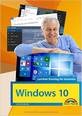
 Windows 10 is the current Microsoft operating system for tablet PCs and desktop computers. Microsoft is updating this Windows 10 cyclically. Do you have a new computer or tablet PC running Windows 10? This book introduces you to how to use Windows 10 step by step and explains the features of the new operating system.
The 2021 edition is an updated reissue of the title that I wrote for the target group of seniors who have no previous knowledge of how to use Windows 10, or who finally want to know more about it.
Windows 10 - Easy entry for seniors (2021)
352 pages, paperbound, Markt+Technik, Burgthann
Price: EUR 19,95
ISBN-10: 33959822464
ISBN-13: 978-3959822466
The four-colour printed book gives you an easy and understandable introduction to Windows 10, whether you are working with a mouse/keyboard or on a tablet PC by finger operation. Step-by-step with this book you will learn how to use Windows 10 and the apps available there.
From the content:
– Windows, the first steps
– The Windows desktop
– Drives, folders and files
– Manage photos
– Games and entertainment
– Internet and e-mail
– Contacts, dates and more
– Customise Windows
– Small aids
– and much more
The 2021 edition takes into account the state of Windows 10 October 2020 Update (20H2).
Can people of the older generation really recommend Windows 10?
I have my doubts. The only real advantage of Windows 10 is its fexibility. But it is precisely this that is the main problem for the older generation. This wants a stable, quiet operating system without constant system or app messages, update notes on shutdown, which can then take half an hour in the event of a wrong reaction and may require several restarts! Sometimes, too often, decisions of the user are called for, which unnecessarily unsettle. The app world with an additional tile menu and its synchronization and update behavior also adds to the uncertainty.
I wait older pleasures their Windows 7 computers, all do not want the APP-oriented Windows 10, although I tried to convey it! Even the multi-user mode with the need to get used to An+Unlogout is hardly comprehensible for older people in Windows 10. While the transition from Windows XP to 7 was not easy for the older generation, Windows 10 is a different world for these people.
Perhaps this book can paint the world of Windows 10 so beautifully that it can convince me, but I lack faith - I would have to read it myself ;-))
I think there's a misunderstanding. The purpose of the book is not to “paint the world of Windows 10 beautifully”. Nobody will buy the book and then enthusiastically switch to Windows 10.
The title was written with the “hat on the head”: Since a user has a Windows 10 computer, is hard with the red thread and wants to be taken at the start of the hand. Then there is the hope that after reading at least the most important things will be mastered.
That's how a shoe turns out. The book is simply an offer, no more and no less. You can use it, but you don't have to.
And to “convince me”: I don't have to convince anyone! Whether a bag of rice falls in China now, or I pretty much take exactly one euro of pre-tax royalties for the one copy sold, the impact on my side is pretty much the same in both events “I just don’t notice anything about it” – only when hundreds of thousands of bags fell at the same time, you might be able to detect something ;-).
It's not a misunderstanding, the cover suggests, how two young-at-heart older gentlemen share moments of happiness with … yes, what do they actually experience? With an operating system? From MS? Unfortunately, the reality of life is different, no matter which BS.
Well, the days when old fish was hammered into a newspaper the day before yesterday are over. If you want to criticise the operating system – there is enough space on the IT blog – and there is the possibility to step on the manufacturer’s feet.
I think I'm one of the last people that can be blamed on Windows 10. The publisher should already be admitted that he prints corresponding stock photos on the cover – shake his head.