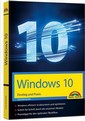
 Windows 10 is the current Microsoft operating system for tablet PCs and desktop computers. If you buy a new computer or tablet PC, it will be equipped with Windows 10. In addition, the upgrade from Windows 7 or Windows 8.1 to Windows 10 until summer 2016 is free.
Have you just switched from an older version of Windows to Windows 10? This book introduces you to how to use Windows 10 step by step and explains the features of the new operating system. In small steps and with many (colored) example images from practice, all important functions as well as the novelties of the current Windows version are explained for beginners.
Windows 10 Getting Started and Practice
360 pages, paperbound, Markt+Technik, Burgthann
Price: EUR 19,95
ISBN-10: 3945384710
ISBN-13: 978-3945384718
The four-colour printed book gives you an easy and understandable introduction to Windows 10, whether you are working with a mouse/keyboard or on a tablet PC by finger operation. Step-by-step with this book you will learn how to use Windows 10 and the apps available there. The book already takes into account the changes that occur in Windows 10 version 1511 (November Update).
From the content:
– Start with Windows
– Advanced service
– Working with folder windows
– View and manage photos
– Listen to music, watch videos
– Internet surfing
– Working with the Mail app
– Contacts, communication and appointments
– Games and other apps
– Customise and maintain Windows
Similar titles:
Windows 10 Easy Access for Seniors
Windows 8.1 incl. update - Easy entry for seniors
Windows 8.1 Update – The Elderly Guide (O’Reilly)
Android tablets and smartphones: The Counselor for Seniors